How to find the Microsoft Entra tenant ID
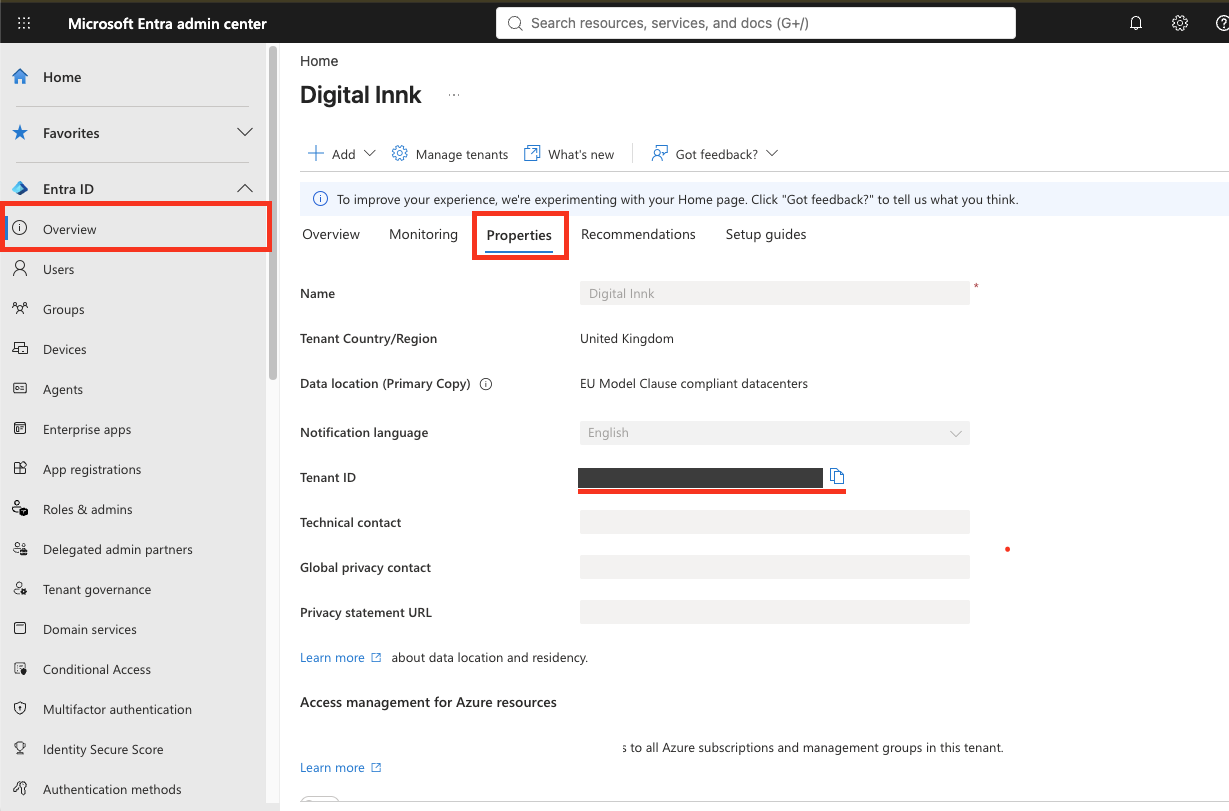
A tenant ID can't be generated. Microsoft assigns it when an organisation's Entra tenant is created, so the lease company's Microsoft admin copies the existing value and shares it with Digital Innk.
| Step | Who | Action |
|---|---|---|
| 1 | Lease company admin (at least Global Reader) | Sign in to the Microsoft Entra admin center |
| 2 | Lease company admin | Browse to Entra ID > Overview > Properties |
| 3 | Lease company admin | Copy the Tenant ID value and send it to Digital Innk. It looks like xxxxxxxx-xxxx-xxxx-xxxx-xxxxxxxxxxxx |
| 4 | Digital Innk | Save it on the lease company document: leasecompany/{id} > entraSso: { enabled: true, tenantId: "<tenant-id>" } |
Status: Draft
Category: Protected
Authored By: Meet Shah on Nov 04, 2026